Wednesday, 6 April 2011

Equipment

Equipment is used to increase your chances of success on a mission. There are 56 available attributes. Here are a few.


Name
Description
Health
Increases your health.
Armour
Increases your armour.
Item Finder
Increases items found.
Rebirth
Gives a 6% chance to resurrect you at 15% health and armour when you die.
Life Leech
Drain and heal a percentage of damage done.
Parry
Gives you a 5% chance to take no damage.


Note when an attribute on a piece of equipment is shown as yellow, its effects stack the more you get. Where white named attributes simply activate if you have a positive number of them.

For Example:
Item finder is a white named attribute. If you have 2 armour pieces with +1 and 1 armour piece with -1 you would activate the skill as you would be left with +1 Item Finder.
However if you removed the -1 piece and had +2 Item Finder the effects would not increase.

Life Leech is a yellow named attribute. Its value is the percentage is uses. +10 LifeLeech drains 10% where as +15 drains 15%.

Changes:
Some attribute change based on conditions. For example Cracked armour gives a chance for you to take double damage, and this chance increases by 4% for every piece of equipment you have with the wornout attribute.

Another example would be Treasure Hunter which increase your loot level. The loot level given is based on your current rank (attrBase + (7 * currRank)).

Equipping:
Using the equipment menu allows you to change your gear and view whats currently equipped.


You can review your stats on the upper screen. However if you want a list of attibutes gained from equipment simply press the 'Attributes' button in the top right.


If you click on an equipment piece on the equipment screen it will present you with the following lower screen.


Allowing you to remove or change the equipment slot with another item.

Set Bonuses:
Some equipment pieces belong to sets. The image above shows a helmet piece called 'Basic Cap' and you can see it belongs to the set 'Basic'.

Equipping all pieces of a set will grant you its set bonus. (you can view the bonus before gaining it by clicking on the yellow button naming the set).

If you remove a piece that breaks the set you lose the attributes of the item and the set. Some armour pieces are only effective when worn as a set. However some set pieces can be mixed and matched, you just wont get the bonus.

Options

The options screen allows you to change a few things.

Extra

The extra button on the main menu will bring you to another menu with more options. Many of which will start locked. You will unlock them throughout the game.


-
Description
Unlocked
Options
Change game options
Starts unlocked
Bios
Look at char/enemy bios
Complete medal [Killer]
Character Select
Change current character
Complete medal [Shopping Addict]
Time Attack
Play time attack mode
Buy from the shop
Survival
Play survival mode
Buy from the shop
Recipe List
List all recipes completed/found.
Complete medal [Experiement]
Item List
List of items you’ve seen at least once
Starts unlocked
Attribute List
View all available attributes for equipment and charms
Starts unlocked
Replay
Replay your saved games
Starts unlocked
Audio List
Play select audio files from the game
Complete medal [Casual]

Shop

The shop is a great place to spend your gold. Here are some of the items sold there.


Name
Cost
Rarity
Description
Potion
35
0
Use to heal 20 hp.
Repair Kit
65
5
Repair 35 ar.
Power Pill
250
92
Causes you to enrage. While enraged deal 10 damage to enemies on contact. Lasts 16.7 sec.
Phoenix Gem
5000
500
Automatically resurrect at 20% health and armour.
Iron Bar
250
23
Common crafting material.
Apple
1500
-
Permanently increase your maximum health and armour by 15 points.


Browse the items and click on something you're interested in to bring more details up.


If the buy button does not show you may be lacking funds or be holding too many of that item already. You many also have run out of inventory space. Your inventory space is increased throughout the game. However an items stack value never changes.

Medals

Medals are collected by completing certain conditions.


When a medal is complete you are given access to its reward. Collect the reward by locating the medal in the Medal List (found on the main menu) and selecting the reward button. A little present image is shown next to medal with uncollected rewards.


Some items can only be obtained through completing medals.
Also note after completing a medal it may unlock a new medal to complete. Sometimes medals may chain unlock up to 5 times.

Tutorials

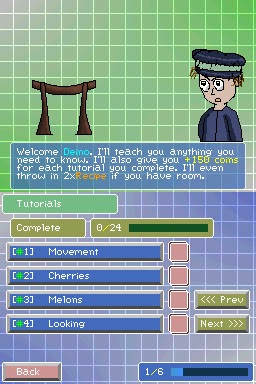
Tutorials allow you to play some simple levels. This will ease you into the game. Your will also earn some gold and recipes for each tutorial you complete assuming you have room in your inventory.


Tutorials are best played when you start the game for the first time. Completing all the tutorials is also one of the 8 stars.

Stats Screen

The stats screen allows you to view some information on your file.

 
-
Description
Name
This is the name of you.
Char
This is the name of your character.
HP
This is your current health; the brackets show how much is attributed from equipments, charms, and bonuses.
AR
This is your current armour; the brackets show how much is attributed from equipments, charms, and bonuses.
DM
This is your current damage; the brackets show how much is attributed from equipments, charms, and bonuses.
B.Pts
This stands for best points. This shows your highest points scored on a level.
Kills
This is your total number of kills in the game.
Died
This is how many times you’ve died in the game. (A death is still counted even if you are resurrected by an Attribute/Perk or item).
Heal
How much your have healed in total throughout the game.
Take
How much damage your have taken throughout the game.
Games
Number of games you have played (whether or not you lost/won or quit).
LootLevel
Your current loot level. The higher this is the better items you will find. Your loot level increases from the following sources
  • A percentage of HP, AR and DM
  • Your current Rank
  • Perk: Pirate
  • Attribute: Treasure Hunter

Your loot level is also boosted temporarily at certain times.
  • A level reward boosts it by 30.
Chests:
  • Red boosts it by 0.
  • Yellow boosts it by 0-3.
  • Green boosts it by 0-5.
  • Blue boosts it by 0-7.
  • Purple boosts it by 0-10.
Title
Your current title. Based on your rank.
Rank
Your current rank. Rank up by earning EXP.
Exp
EXP or experience is earned through completing missions, certain medals and using special items.
Playtime
Your files playtime. Hour : Mins : Seconds : Hundredth